A hydraulic line fails on a Tuesday morning. The crew stands around while a service call gets routed, parts get sourced, and a rental machine gets dispatched. By the end of the day the schedule has slipped, the customer is asking questions, and the finance team is trying to figure out which job absorbs the cost. Most of that pain traces back to a maintenance program that runs on memory, spreadsheets, and reaction time. Equipment maintenance scheduling software connected to ERP data replaces that guesswork with a connected workflow that flags what needs attention, finds the right service window, generates accountable work, and returns the machine to service with a full cost trail behind it.
Let ERP Data Surface the Equipment That Needs Attention
Preventive maintenance breaks down when it depends on someone remembering to check a binder. An ERP-driven approach flips that model. Every asset in the system carries a maintenance profile that includes usage thresholds, calendar intervals, manufacturer specifications, and condition inputs from the field. The system continuously compares those thresholds against live telemetry, timecard hours, fuel burn, meter readings, and job site notes, then surfaces only the equipment that is approaching or past due for service.
This is what an exception-driven workflow looks like in practice. Instead of scheduling every asset on a rigid rotation, the shop foreman opens a daily dashboard that shows a short, prioritized list. A skid steer at 248 hours is closing in on its 250-hour service. A generator missed a quarterly inspection because it moved between two jobs. A truck reported a low oil pressure alert. Everything else stays quiet. The team spends time on decisions rather than data entry, and small issues get addressed before they turn into a breakdown on a critical path. Our team at DC Tech Group helps contractors configure these thresholds inside their ERP and business management platforms so the alerts reflect the actual way each fleet is used.
Find a Service Window Without Disrupting the Job Schedule
Knowing that a machine needs service is only useful if you can schedule it without stalling a crew. This is where the ERP connection earns its keep. The maintenance module reads directly from the project schedule, resource assignments, and job phases, then proposes service windows that avoid production impact. If a paver is scheduled on a downtown job through Friday, the system will suggest Saturday morning at the yard or a mobile service call during the planned weather delay next Tuesday.
Balance Urgency, Location, and Technician Capacity
Scheduling logic considers three variables together. Urgency is set by how far past threshold the asset is and the risk category of the service. Location matters because dispatching a mobile technician to a job site is often cheaper than transporting the equipment back to the shop. Technician capacity closes the loop by matching the required skill set to available hours on the labor calendar. The output is a proposed work order with a date, a location, an assigned technician, and an estimated duration, ready for approval.

Generate Accountable Work Orders That Move Through the Shop
Once a service window is approved, the ERP generates a work order that carries every detail the technician needs. That includes the asset ID, the specific service tasks pulled from the maintenance template, safety notes, torque specs, warranty status, and links to the last three service records for that machine. The work order is assigned to a named technician and time-stamped, so accountability is built in from the start.
The technician receives the work order on a tablet or phone at the shop or in the field. As tasks are completed, checkboxes get updated, meter readings get logged, and any additional findings such as a worn belt or a cracked hose get added as new line items. If a follow-up service is required, the system creates a related work order automatically so nothing gets forgotten. This is the difference between a work order that documents what happened and one that actually drives the work forward.
Track Parts and Labor as the Work Happens
Every service consumes parts and labor, and both need to flow into the ERP the moment they are used. When a technician pulls a filter kit from the parts room, the inventory count decrements in real time. When quantities fall below the reorder point, a purchase requisition drafts automatically for the parts manager to review. This is how contractors avoid the two most common inventory failures: sitting on obsolete stock and running out of the parts they use most.
- Parts consumption posts against the specific work order and asset, building a lifetime parts history for every machine.
- Labor hours flow from the technician's time entry into both the work order and the payroll system, eliminating duplicate entry.
- Outside services such as a specialty welding shop or a hydraulic rebuild vendor attach to the work order with the purchase order and invoice linked.
- Warranty claims get flagged automatically when a covered part fails, so reimbursements do not slip through the cracks.
Contractors that manage this data inside a connected ERP platform gain a clear picture of parts velocity, technician productivity, and vendor performance. DC Tech Group works with construction and field service teams to align these workflows across their construction technology stack so parts, labor, and job costs move together instead of living in separate systems.
Return the Equipment to Service with a Complete Cost History
When the service is complete, the technician closes the work order with a final meter reading, a status change to available, and any notes for the next service cycle. That single action does several things at once. The asset becomes visible to dispatchers looking to assign it to the next job. The maintenance clock resets against the new thresholds. And the full cost of the service posts to the equipment's lifetime cost record, which now includes acquisition cost, every service event, every part consumed, every hour of technician labor, and any downtime the machine has accumulated.
Turn Cost History into Better Fleet Decisions
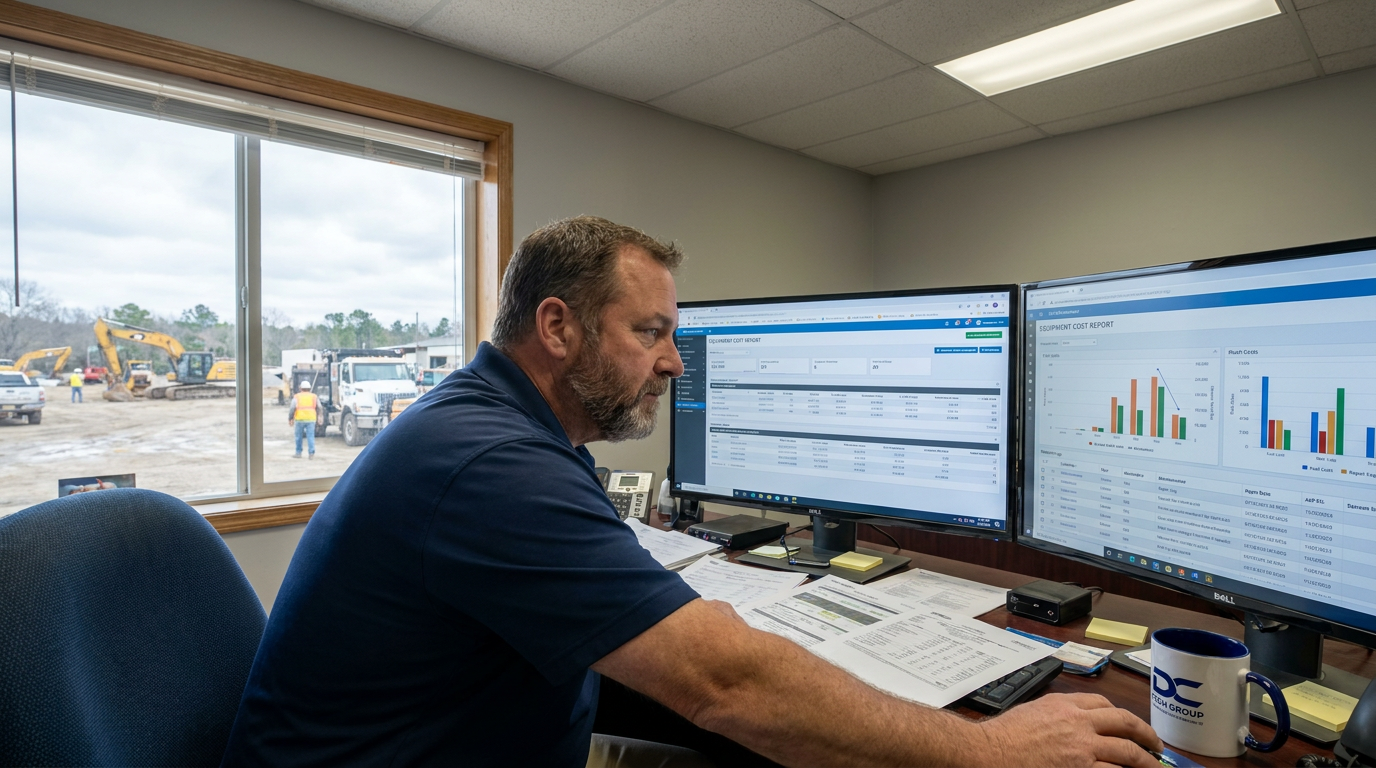
The lifetime cost record is where equipment maintenance scheduling software stops being an operational tool and starts being a strategic one. When a controller can pull a single report showing that a specific excavator has cost eighteen percent more per operating hour than its peers over the last two years, the conversation about whether to repair, rebuild, or replace becomes evidence-based. Bid teams can use accurate ownership cost data when pricing future work. Fleet managers can identify which manufacturers, models, or even operators are driving up service costs. This is the payoff for building the workflow correctly from the beginning, and it is why we help clients configure reporting inside their ERP implementation projects rather than treating it as an afterthought.
Talk with DC Tech Group about connecting your ERP to a maintenance workflow that prevents breakdowns before they happen.
Common Questions About ERP-Driven Maintenance Scheduling
How is equipment maintenance scheduling software different from a standalone CMMS?
A standalone CMMS manages work orders and asset records in isolation. Equipment maintenance scheduling software built on ERP data connects those same functions to job schedules, inventory, purchasing, payroll, and job costing, so maintenance decisions reflect the full operating picture rather than a single department view.
What data do we need to get started with an exception-driven maintenance workflow?
At minimum you need an accurate asset list with acquisition dates, manufacturer service intervals, current meter readings, and a starting parts catalog. From there you can add telemetry feeds, technician skill profiles, and historical service records to make the exception logic more precise over time.
How long does it take to see cost savings from a connected maintenance workflow?
Most contractors see measurable improvements in unplanned downtime and parts spend within the first two service cycles once thresholds are configured correctly. The larger benefit, which is better repair-versus-replace decisions, becomes visible as twelve to eighteen months of clean cost history accumulates.